Review and select IROs
Select the IROs that will be assessed by your stakeholders, and document why you leave the others out.
Introduction
The AI generated a long list, typically 100 to 200 IROs, each with its sources and an AI score. Your job is to turn it into a short list for stakeholder engagement. Most companies end up with 40 to 70 IROs. A lighter approach, one or two IROs per subtopic, is fine when your stakeholders have little time.
You know your business better than the AI. This step is where that knowledge counts most. Plan one to two days of focused work for it.
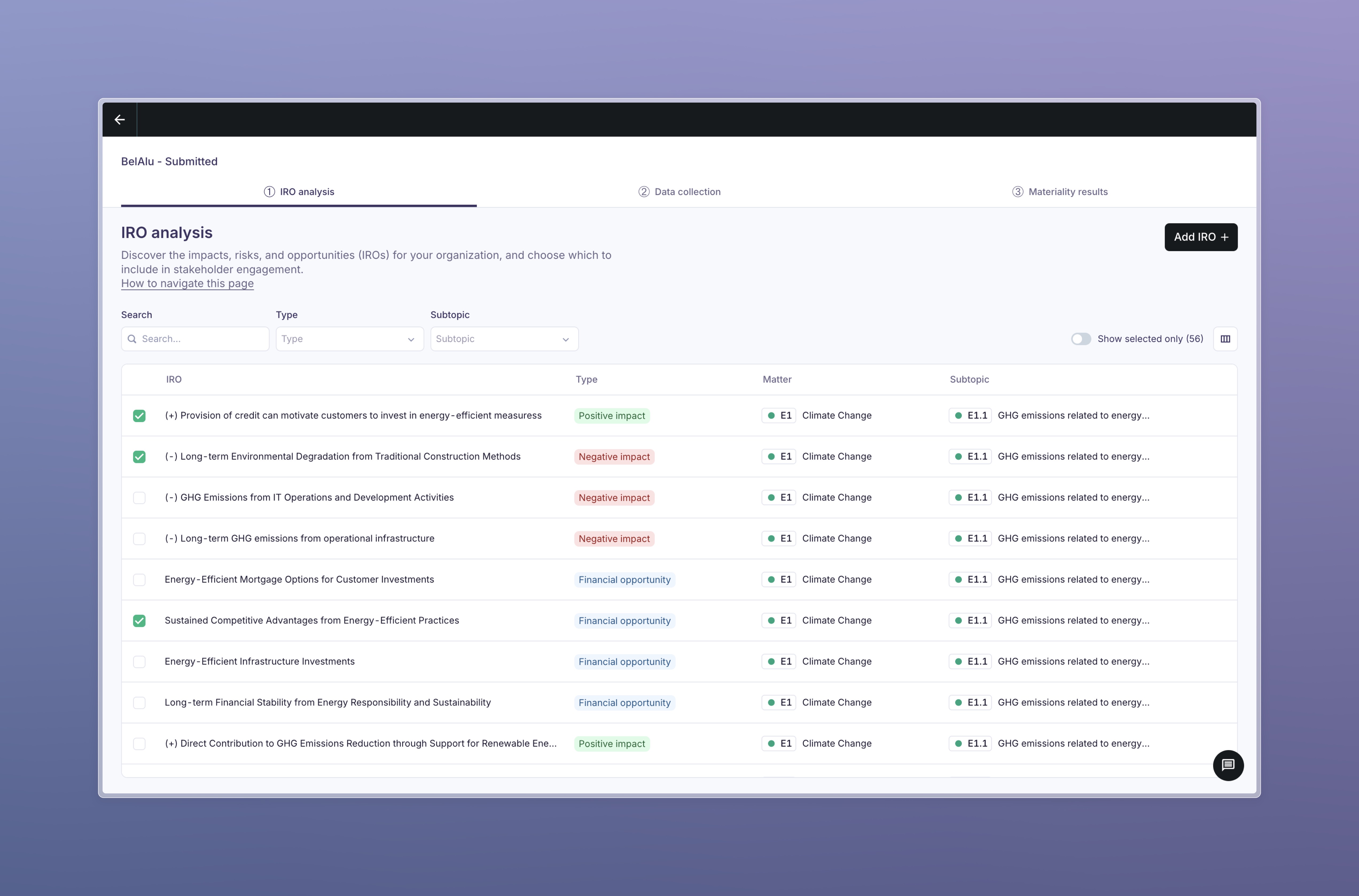
The IRO table
All IROs sit in one table. For each IRO you see:
| Column | Meaning |
|---|---|
| IRO | The title. Click it to open the IRO passport. |
| Type | Positive impact, negative impact, financial risk or financial opportunity. |
| Expected materiality | High, Medium or Low. Inherited from the AI pre-assessment of the IRO's subtopic. |
| Topic | The ESRS subtopic, with its code. |
| Context icons | Value chain position, time horizon, actual or potential, human rights. Hover to read them. |
Use the filters to work topic by topic: search by title, filter on topic, type, value chain position, time horizon or likelihood, and switch on Show selected only to check your short list.
Choosing several types or several subtopics in one filter shows IROs that match any of them. Combining different filters narrows the list.
The IRO passport
Click an IRO anywhere in the assessment and its passport opens as a panel next to the list. Use the previous and next arrows to move from one IRO to the next in the current filtered order. The passport is the same in every step; only the default tab changes with the step you are in. It is where you understand and challenge an IRO without leaving the list.
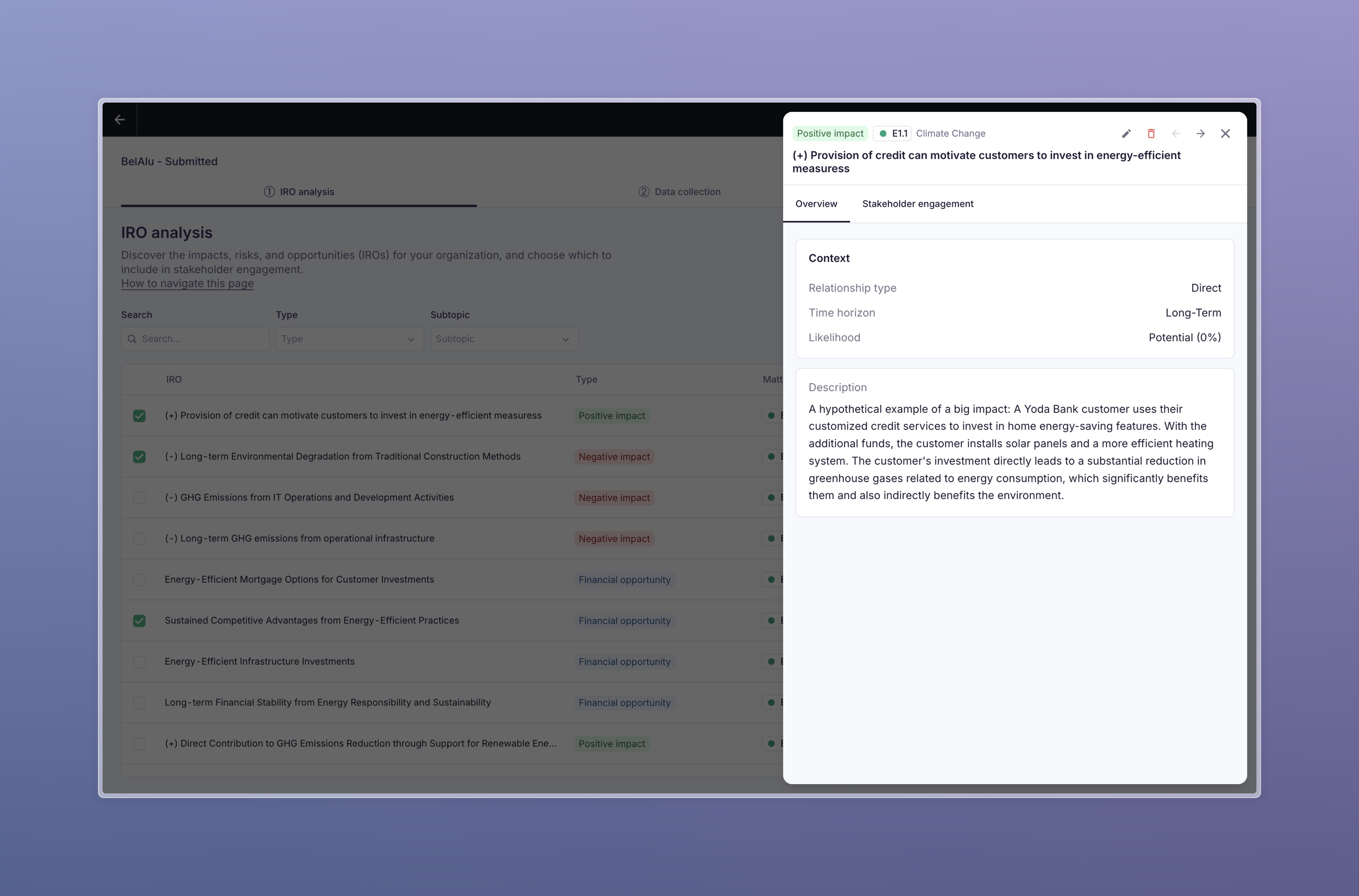
Header. Type, expected materiality and subtopic, the title, whether the IRO is selected for stakeholder engagement, and the controls to edit, select, deselect or delete it.
Overview tab. The context labels of the IRO:
| Label | Values |
|---|---|
| Value chain | Upstream, own operations, downstream. An IRO can have more than one. |
| Time horizon | Short term (under 1 year), medium term (1 to 5 years), long term (over 5 years). |
| Likelihood | Actual (already happening) or potential (may happen). |
| Human rights abuse | Yes or no. For yes, severity takes precedence over likelihood in the scoring. |
Below the labels: the description of what the IRO is and how it connects to your activities, the drivers (the facts about your company that make this IRO real, one per line), the rationale for why the AI considers it relevant, and the sources with the section they came from. Click a document to preview it. The sources are the answer to "which of my documents led to this?". Public and sector sources are often a large share of the evidence; that is normal and does not mean your documents were ignored.
Stakeholder engagement tab. The stakeholder question and its context as your stakeholders will see them, the groups the question is assigned to, and the number of responses received per group. From here you can jump to the stakeholder group settings.
Result tab. Once results are calculated: the IRO's stakeholder score, its contribution to the subtopic score, and the AI score for comparison.
The Result tab is being built as part of the results step rework. Until then, IRO-level results are available in the results details and in the Excel export.
The AI report
Everything above lives in the platform: the IRO list, the labels, the AI scores and the sources. Alongside it you receive the AI report, an HTML file you open in your browser. It is the long-form version of the same analysis, written for the moments when the table does not give you enough to decide. Keep it open next to the IRO table while you work through this step.
It is one self-contained file. Nothing to install, no login, and you can forward it to a colleague or an auditor as it is.
What is in it
| Section | What it gives you |
|---|---|
| 1.1 Material topics | Every ESRS subtopic with its impact and financial score and the rationale behind each one, expandable topic by topic. |
| 1.2 Top-down materiality matrix | The AI pre-assessment plotted on the two axes, before any IRO-level detail. |
| 2.1 Material IROs | Every IRO scored against the ESRS 1 criteria, with its severity breakdown, its value chain and time horizon labels, and whether it passes the materiality threshold. |
| 2.2 Bottom-up materiality matrix | The same two axes, rebuilt from the aggregated IRO scores. |
| 2.3 Subtopic coverage | The conclusion carried by each subtopic: assessed through IROs, not material with a rationale, or covered within an adjacent subtopic. This is the section that answers "why did you not assess biodiversity?". |
| 3.1 Top-down vs bottom-up | Both matrices on one chart, with an arrow per subtopic showing how far it moved once the AI looked at the detail. |
| 4.1 IRO questions | The stakeholder question for every IRO, in each of your assessment languages. |
| 4.2 Stakeholder engagement plan | Suggested stakeholder groups, methods and participant numbers per IRO, as a starting point for the next step. |
How to use it in this step
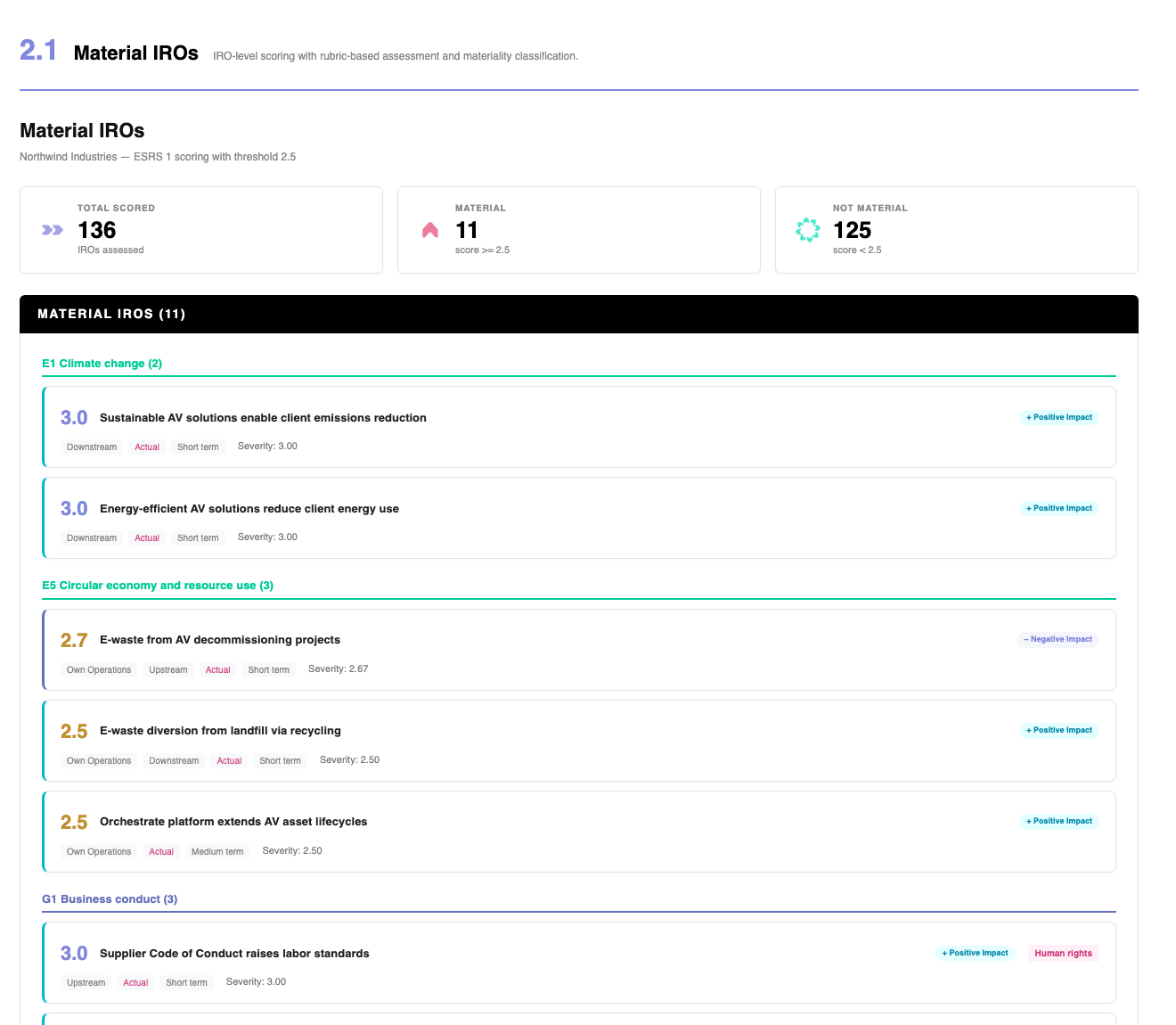
Section 2.1 is the one you will use most here. Where the IRO table gives you a title and a score, this gives you the scoring itself: which criteria produced the number, and how far the IRO sits from the threshold. It is the quickest way to tell a borderline IRO from a clear one.
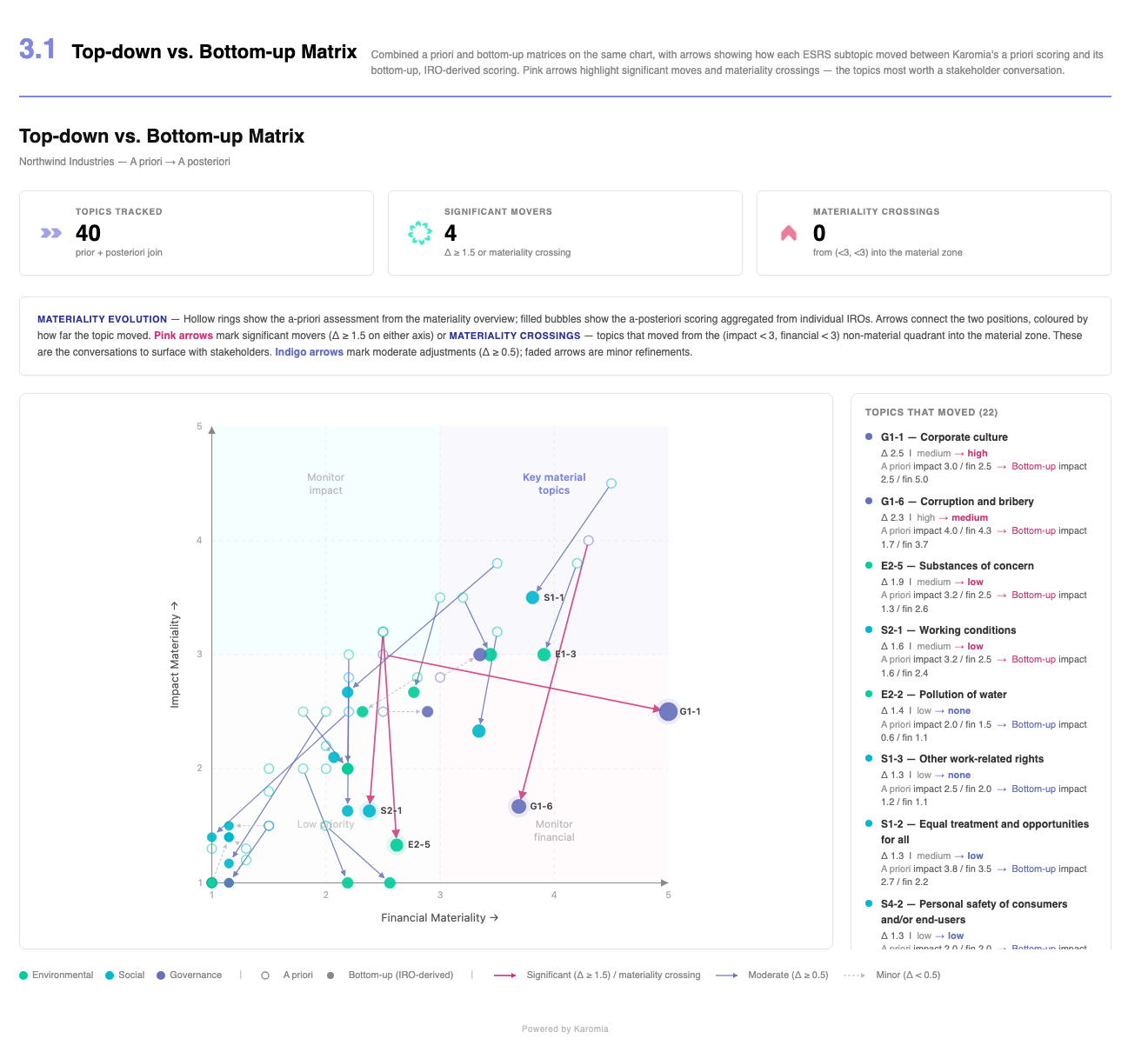
Section 3.1 is where you find the grey zone. A subtopic with a long arrow moved a lot once the AI scored the individual IROs, and a subtopic that crossed into the material zone changed conclusion. Those are the ones worth putting to stakeholders, and the ones to read closely before you decide what to select. See Plan your engagement.
The AI report is produced by Karomia and sent to you with your IROs. It is not generated from the platform. Ask through the in-app chat if you need it again, or in another language.
The report is an analysis, not a decision. Its scores are the AI's, and they never enter your results: your materiality comes from stakeholder answers alone. Read the drivers and the sources before you rely on a number. See How Karomia generates your IROs.
Steps
Step 1: Decide your level of granularity
Before you start, agree on how many IROs you want per subtopic. Three common patterns:
- Full assessment: at least two IROs per relevant subtopic, one impact and one financial, 50 to 70 IROs in total.
- Light assessment: one IRO per subtopic that matters, 20 to 40 IROs. Good when your stakeholders have little time or when you already have a recent DMA.
- Internal assessment only: when only your own team will score, keep more IROs and let the scores decide. Selection mainly matters when you need to limit the burden on external stakeholders.
Step 2: Review by topic
Work through the topics in order. For each subtopic:
- Read the IROs. Open the passport when you want the drivers, the rationale and the sources.
- Check the AI's emphasis against reality. An activity that is 3% of your turnover should not carry a third of your IROs, even if your documents talk about it a lot.
- Prefer the negative impact over the positive one when you have to choose. Auditors expect you to assess the full negative impact rather than only the actions you take in response to it. Select a positive impact when it is not merely compensating for a negative one.
- Select at most one IRO per angle. Two IROs that say nearly the same thing double the work for your stakeholders without adding information.
Step 3: Select and deselect
Tick the checkbox to select an IRO for stakeholder engagement. Untick to leave it out. Every selected IRO becomes one question in your surveys, interviews and focus groups.
Record the reason when you deselect an IRO that was expected to be material, or when you skip an entire subtopic. A paragraph is enough. Auditors have asked our clients for exactly this evidence, and next year's you will thank you.
An IRO passport with the selection control and a note explaining why the IRO is left out.
Step 4: Edit and add IROs
Click the pencil in the passport to edit an IRO. You can change the context labels, the title, the description and the stakeholder question. Mandatory fields for a new IRO are the subtopic and the type.
Add your own IROs with Add IRO when you know a matter the AI missed, for example a risk from your risk register. Write it in your default language and let Karomia translate the question and its context when your list is final; see Review questions and translations.
The list you leave this page with is the list your stakeholders score. Once the first survey is sent, changing it has consequences you cannot undo from the interface: a newly added IRO is assigned to groups that have already answered, the people who finished are not asked the new question, and the IRO still has to be translated into every language before anyone can see it. Do a full pass now, with the colleagues who know the business, rather than a partial pass and corrections later. If a change is unavoidable once collection has started, contact us through the chat first so we make it with you and record what changed.
Step 5: Work in Excel if you prefer
Many clients review the list in Excel with colleagues. Use Export to download the IRO list, add your comments and selection in the file, and send it back to us through the chat. We re-import it. Do not change the hidden ID columns.
Using the AI scores
The expected materiality and the AI scores in the passport help you prioritise. They are not a selection rule. A low expected materiality with a strong driver in your documents is worth a second look. A high expected materiality for a sector topic that does not apply to you is a reason to deselect, with a note.
Before you move on
- Every topic has been reviewed, not only the obvious ones.
- Your short list has a reasonable spread across impact and financial IROs.
- You wrote down why you left out what you left out.
- If your DMA will be audited: now is the moment for a checkpoint with your auditor, before stakeholders are engaged.
- The list is final. Everyone who needed to see it has seen it, in every language you will use.
Output
- A final short list of IROs, the questions your stakeholders will be asked. Every selected IRO becomes one question.
- A written reason for every IRO and every subtopic you left out, which is the evidence an auditor asks for most often.
- The list is now locked for the rest of the cycle.