Get Your DMA Report
Once all materiality decisions are finalised, you can generate your DMA report. The report documents the full assessment process and results in a format aligned with CSRD and ESRS requirements.
Report structure
The DMA report is divided into six sections:
| Section | Contents |
|---|---|
| Summary | High-level overview of the assessment and key outcomes |
| Methodology | Description of the DMA process, phases, and EFRAG-aligned approach |
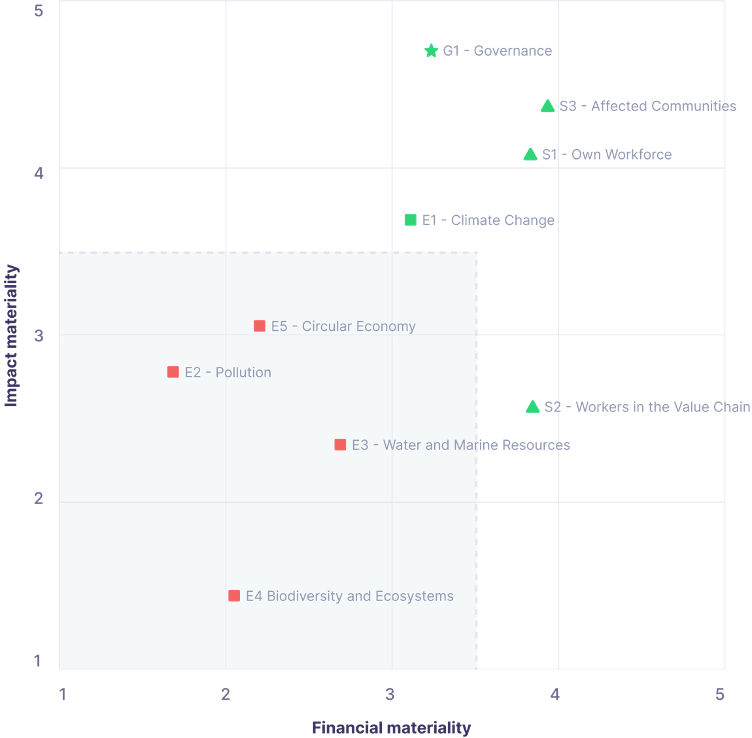
| Results | Materiality scores and classification for all ESRS topics |
| Analysis | Breakdown of scores by impact and financial materiality dimensions |
| Discussion | Interpretation of results and their implications |
| Appendix | Supporting data, stakeholder group details, and IRO listings |
Areas for user input
Several sections of the report require your input before the report is complete. These are marked in the report editor and include:
-
IRO selection reasoning — An explanation of how and why you selected the IROs included in the assessment.
-
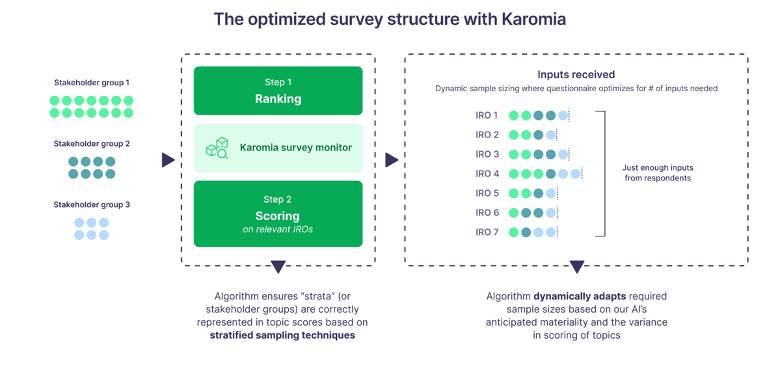
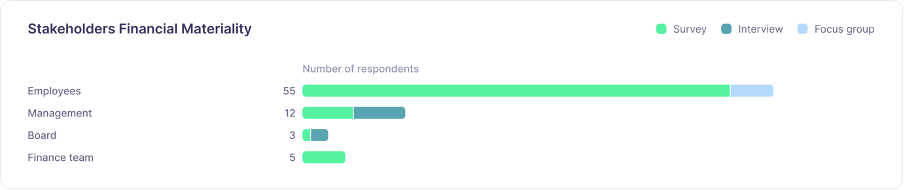
Data collection decisions — A description of the data collection methods used and the rationale for your stakeholder group design.
-
Additional disclosures — Any context, caveats, or supplementary information relevant to specific results.
-
Undecided topic decisions — Documentation of the final judgements made for each undecided topic and the reasoning behind them.
Generating the report
When your input sections are complete, click Generate Report. Karomia compiles the full report as a PDF. The report is designed to support CSRD/ESRS audit review and can be shared with your auditor or disclosed as part of your sustainability reporting.
Complete the user input sections before generating the report — the quality of your written explanations is as important as the quantitative results for audit readiness.